
You can not select more than 25 topics
Topics must start with a letter or number, can include dashes ('-') and can be up to 35 characters long.
1.4 KiB
1.4 KiB
Light Anchor reference
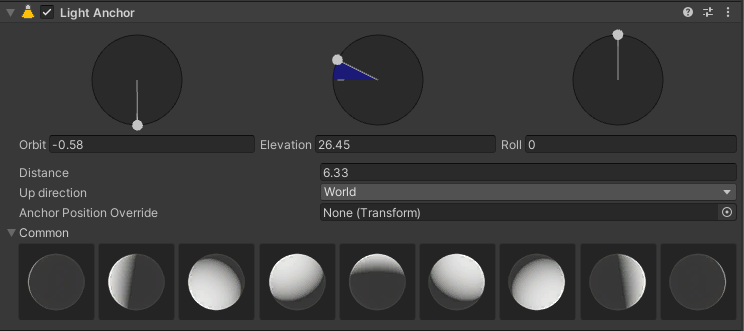
Properties
| Property | Description |
|---|---|
| Orbit | Use the left icon to control the Orbit of the light. This tool becomes green when you move the icon. |
| Elevation | Use the middle icon to control the Elevation of the light. This tool becomes blue when you move the icon. |
| Roll | Use the right icon to control the Roll of the light. This tool becomes gray when you move the icon. This is useful if the light has an IES or a Cookie. |
| Distance | Controls the distance between the light and its anchor in world space. |
| Up Direction | Defines the space of the up direction of the anchor. When you set this value to Local, the Up Direction is relative to the Camera. |
| Anchor Position Override | Allows you to use a GameObject's Transform as anchor position instead of the LightAnchor's Transform. When the Transform of the GameObject you assigned to this property changes, the Light Anchor's Transform also changes. |
| Common | Assigns a preset to the light component based on the behavior of studio lights. |