
7.8 KiB
Scripting in the Water System
Access Water Surface height
You can add buoyancy to the water simulation with a script that queries the height of the water surface.
To do this, enable Script Interactions in the water surface you want to query (see Settings and properties related to the Water System).
The WaterSearchParameters struct makes water height queries possible.
One object
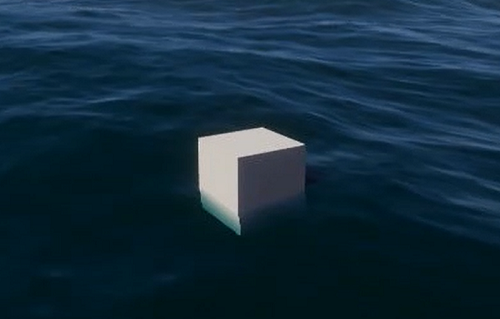
This is an example script to float one object on a water surface.
using UnityEngine;
using UnityEngine.Rendering.HighDefinition;

public class FitToWaterSurface : MonoBehaviour
{
    public WaterSurface targetSurface = null;

    // Internal search params
    WaterSearchParameters searchParameters = new WaterSearchParameters();
    WaterSearchResult searchResult = new WaterSearchResult();

    // Update is called once per frame
    void Update()
    {
        if (targetSurface != null)
        {
            // Build the search parameters
            searchParameters.startPositionWS = searchResult.candidateLocationWS;
            searchParameters.targetPositionWS = gameObject.transform.position;
            searchParameters.error = 0.01f;
            searchParameters.maxIterations = 8;

            // Do the search
            if (targetSurface.ProjectPointOnWaterSurface(searchParameters, out searchResult))
            {
                Debug.Log(searchResult.projectedPositionWS);
                gameObject.transform.position = searchResult.projectedPositionWS;
            }
            else Debug.LogError("Can't Find Projected Position");
        }
    }
}
Multiple objects (with Burst)
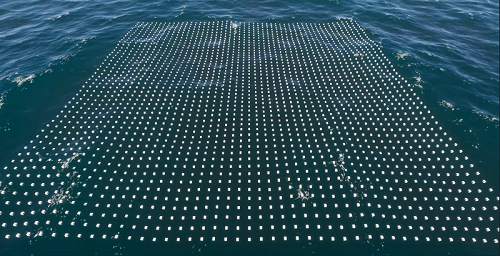
This is an example script to float an array of objects on a water surface using the Burst compiler.
using System.Collections.Generic;
using Unity.Collections;
using Unity.Jobs;
using Unity.Mathematics;
using UnityEngine;
using UnityEngine.Rendering.HighDefinition;

public class FitToWaterSurface_Burst : MonoBehaviour
{
    // Public parameters
    public int resolution = 50;
    public WaterSurface waterSurface = null;

    // List of internal cubes
    List<GameObject> cubes = new List<GameObject>();

    // Input job parameters
    NativeArray<float3> targetPositionBuffer;

    // Output job parameters
    NativeArray<float> errorBuffer;
    NativeArray<float3> candidatePositionBuffer;
    NativeArray<float3> projectedPositionWSBuffer;
    NativeArray<float3> normalWSBuffer;
    NativeArray<float3> directionBuffer;
    NativeArray<int> stepCountBuffer;

    // Start is called before the first frame update
    void Start()
    {
        // Allocate the buffers
        targetPositionBuffer = new NativeArray<float3>(resolution * resolution, Allocator.Persistent);
        errorBuffer = new NativeArray<float>(resolution * resolution, Allocator.Persistent);
        candidatePositionBuffer = new NativeArray<float3>(resolution * resolution, Allocator.Persistent);
        projectedPositionWSBuffer = new NativeArray<float3>(resolution * resolution, Allocator.Persistent);
        normalWSBuffer = new NativeArray<float3>(resolution * resolution, Allocator.Persistent);
        directionBuffer = new NativeArray<float3>(resolution * resolution, Allocator.Persistent);
        stepCountBuffer = new NativeArray<int>(resolution * resolution, Allocator.Persistent);

        for (int y = 0; y < resolution; ++y)
        {
            for (int x = 0; x < resolution; ++x)
            {
                GameObject newCube = GameObject.CreatePrimitive(PrimitiveType.Cube);
                newCube.transform.parent = this.transform;
                newCube.transform.localPosition = new Vector3(x * 5, 0.0f, y * 5);
                cubes.Add(newCube);
            }
        }
    }

    // Update is called once per frame
    void Update()
    {
        if (waterSurface == null)
            return;
        // Try to get the simulation data if available
        WaterSimSearchData simData = new WaterSimSearchData();
        if (!waterSurface.FillWaterSearchData(ref simData))
            return;

        // Fill the input positions
        int numElements = resolution * resolution;
        for (int i = 0; i < numElements; ++i)
            targetPositionBuffer[i] = cubes[i].transform.position;

        // Prepare the first band
        WaterSimulationSearchJob searchJob = new WaterSimulationSearchJob();

        // Assign the simulation data
        searchJob.simSearchData = simData;

        // Fill the input data
        searchJob.targetPositionWSBuffer = targetPositionBuffer;
        searchJob.startPositionWSBuffer = targetPositionBuffer;
        searchJob.maxIterations = 8;
        searchJob.error = 0.01f;
        searchJob.includeDeformation = true;
        searchJob.excludeSimulation = false;

        searchJob.errorBuffer = errorBuffer;
        searchJob.candidateLocationWSBuffer = candidatePositionBuffer;
        searchJob.projectedPositionWSBuffer = projectedPositionWSBuffer;
        searchJob.normalWSBuffer = normalWSBuffer;
        searchJob.directionBuffer = directionBuffer;
        searchJob.stepCountBuffer = stepCountBuffer;

        // Schedule the job with one Execute per index in the results array and only 1 item per processing batch
        JobHandle handle = searchJob.Schedule(numElements, 1);
        handle.Complete();

        // Fill the input positions
        for (int i = 0; i < numElements; ++i)
            cubes[i].transform.position = projectedPositionWSBuffer[i];
    }

    private void OnDestroy()
    {
        targetPositionBuffer.Dispose();
        errorBuffer.Dispose();
        candidatePositionBuffer.Dispose();
        projectedPositionWSBuffer.Dispose();
        normalWSBuffer.Dispose();
        directionBuffer.Dispose();
        stepCountBuffer.Dispose();
    }
}
Access Water Surface normal
The normal of the water surface at a given point can be queried as an additional output when accessing height. To do this, set the following variable in the search parameter struct sent to the system.
searchParameters.outputNormal = true;
Then the result can be used, for example to align an object along the surface of the water
gameObject.transform.LookAt(searchResult.projectedPositionWS + searchResult.normalWS, Vector3.up);
When using the Burst version of the API as in the sample above, don't forget to allocate the array to store normal result. This following script contains only the relevant lines to add to the one above to support querying normals.
public class FitToWaterSurface_Burst : MonoBehaviour
{
    NativeArray<float3> normalWSBuffer;

    void Start()
    {
        normalWSBuffer = new NativeArray<float3>(resolution * resolution, Allocator.Persistent);
    }

    void Update()
    {
        searchJob.outputNormal = true;
        searchJob.normalWSBuffer = normalWSBuffer;
    }

    private void OnDestroy()
    {
        normalWSBuffer.Dispose();
    }
}
Synchronizing Water Surfaces
When making a multiplayer game, it can be useful to ensure all clients have a water simulation that is running in sync. You can achieve this by specifying the absolute time at which the simulation started by using the following API:
water.simulationStart = new DateTime(2008, 5, 1, 8, 30, 52); // HDRP will compute the water simulation as if the program started at that time
Alternatively, if you have a reference water surface, you can make sure other existing surfaces are synchronized with this one by copying the start value:
water.simulationStart = referenceSurface.simulationStart;