You can not select more than 25 topics
Topics must start with a letter or number, can include dashes ('-') and can be up to 35 characters long.
955 B
955 B
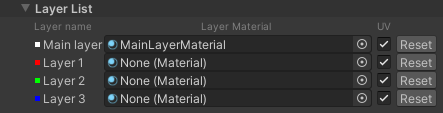
This section contains a list of the Materials that this Layered Material uses as layers. To assign a Material to a layer, either drag and drop a Material into the property field for that layer, or:
- Click the radio button on the right of the layer to open the Select Material window.
- Find the Material you want from the list of Materials in the window and double-click it.
If you modify the referenced Material in any way, you can synchronize the properties by pressing the Reset button. This copies all of the properties from the referenced Material into the relevant Layered Material layer.
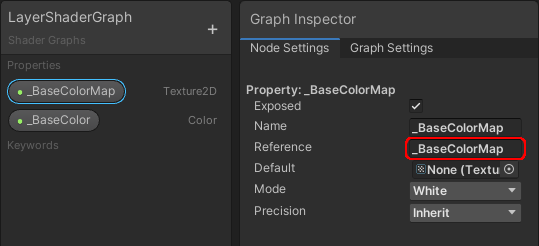
If you assign a Material made from a Shader Graph as a Layer Material, make sure the Reference of the properties matches the name of the corresponding properties in the LayeredLit Material. For an example of what this means, see _BaseColorMap in the screenshot below: